2019/01/20

Program Dodge used ECM with wiTech Micropod2 clone

Witech Micropod II new test report from obdii365.com customer. 

 Amazing. I received the device in record time. I was nervous if this device will work to program an used ECM that I replaced from another Dodge to my Dodge. Purchased a subscription at Tech Authority, and this device showed that the ECM/TCM had new flash to be upgrade. At the beginning I had an error on my PC that this device did not support my car with the latest version 17.0.4 (something like that). I did uninstall the new software and installed the old 17.0.3 and worked. I did flash and reprogram with no issue at all, and bang the Dodge came alive with no problem. This device works like a charm.
Thank you again.  

2019/01/16

MicroPOD II and VCI Pod: Which is better for DRB3 Emulator?

Discussion: DRB3 compatibility with MicroPOD II and VCI Pod. 

Car: 2004 Chrysler 300M
Software: DRB3
Firmware: wiTech MicroPOD 2 and VCI Pod

It is said that the MicroPOD II can run the enhanced DRB III emulator with WiTech App v16.04.12. However this app version might require to run online, connected to TechAuthority. If it does you’re screwed because it will be banned based on its ID.

I have a Micropod II V17.04.27 Type C…. But I can not use it, because it can not find the ECU. can only display battery voltage. I can only select cars between 2017 and 2004. I have a 2004 300M, but no chance. I think only real CANbus can be used.
the extended DRBIII Emulator can not work, it needs an update, but this would make the adapter useless I think.

So, I think, only witech VCI Pod can help.

This is what I’ve tested:
Alarm: tried to force activation but I’m missing a sensor in the trunk, so it won’t activate.
EVIC/ATC: screens autodiagnostics
Memory seats: enabled the glide feature (easy exit) on a 1999 and 2000 Ms!
ECU tests: Fuel injector #1 (it fires the fuel pump and opens the injector, I guess you need to have the injector off the car to really see what’s going on).
BCM tests: Lights tests (it flashes all lights or a specific one you choose so you can see if the bulb/wiring/bcm are ok).
TCM tests: I don’t remember but I think the engine has to be running for the tests to complete (you are supposed to look at the RPMs while the TCM triggers the solenoids).
RKE: tested the keys (it tells you which button is pressed on the fob)
And there are so much values you can read… Basically you can read all sensors of course, but you can get the interior light dimmer switch output, sun sensor value, heated seats temperature IIRC… It’s a great tool but IMO it doesn’t worth that much considering you cannot flash modules.

Flashing was a failure for the TCM. However it looks like I could flash the EVIC if a flash was available. I used a flash for another model, made some changes to the flash file descriptor (basically it’s an XML file describing the flash, what part number it replaces, what old part numbers are flashable, etc…) but I didn’t press the button as it would have break the EVIC.

Fyi, flash files are available from TechAuthority website but you need a subscription. A 1 or 3 days subscription is enough. The flash application packaged with WiTech software 13.x is old, so you should use the one from TechAuthority. The thing is, it also downloads a newer driver and WiTech server program, and they won’t work with WiTech 13.x or 14.x. For this reason I used my corporate laptop and/or a virtual machine, dedicated to the flashing app.
Once you have selected a flash on TechAuthority website, it downloads a few files in your computer temporary folder. You can save these files (basically I copy-pasted the files in a new folder named after the flash part number) and reuse them latter. That way, you don’t need the TechAuthority subscription anymore. It should also work for real DRBIII devices. Simply copy-paste the files from where you saved them to your temp folder. IIRC you have to start the flash application once to get the required subfolders created in the temp folder.
With the 13.x software version, from the DRBIII emulator, you can run the non-powertrain flash application. And this flash app was able to read the part number from the EVIC on the car, while the powertrain flash app (and also the flash app from TechAuthority) could not read the part number from the TCM. That’s why I’m guessing I should be able to flash the EVIC. Also I talked with a guy on YouTube who was able to flash the EVIC on his Jeep (2002 IIRC).
For most tests, I had the engine not running, key in RUN position.
Want a good reason? lol!
That’s exactly why I waited so long… Well you can talk to the ABS module and read the codes, which is not possible on the 300M with a cheap ELM327! You can run the ABS bleeding procedure (not tested yet), read the Clutch Volume Indexes from the transmission, pair a new PCM/BCM/SKIMM module (not tested)…
I wouldn’t get the newer dongles, they run a bit cheaper on AliExpress but I’ve read they don’t work with the TechAuthority web components, which is the all point of having the new device over the VCI Pod. So don’t buy one!

On a side note, DRB3 and VCI Pod setup instruction I’m using: http://blog.obdii365.com/2017/08/17/review-drb3-emulator-witech-vci-pod-clone/

2019/01/01

What is best for all Chrysler (-2018): MicroPod 2? CDA?

This is for those looking for a decent tool works on and flashes all Chrysler vehicles the same level as dealer technician can.

Purpose: Want to have full “dealer level” capability for all Chrysler – Hemi / Cummins / body modules, Ecodiesel, Pentastar 3.6, everything Chrysler / Ram like we do on GM and Ford

Tools used: have Cardaq J2534 device, have used the J2534 program for flashing in the past as well as the J2534 Drewtech toolbox for some skim and vin updates
Issues: Have a few big name scan tools we are able to do a lot of functions but just always end up something we can’t do
For example: 2014 Ram 1500 air suspension, unable to perform the system recharge function for the air ride, although our tools have the bag fill, system test, etc, missing the one function and have to send it to dealer.
Budget: Not afraid of paying for the right stuff, but afraid of paying for less than i need or having issues.
My ideas of devices:
WiTech VCI Pod
WiTech Micropod II
DRB
DRB Emulator
CDA
StarScan
pre-2004 not worried about, generic scan tools work well enough for most things
2004-2012 – have good coverage but run into things not able to perform, for instance can do the Quick Learn on RFE transmissions but cannot do the DRIVE LEARN, Drewtech advises against reflashing modules with J2534 software as high failure rate,
2013-up this is where our coverage gets a lot more spotty  – have a lot of WIN modules we replace but have been able to program them with one of our aftermarket tools but only up to 2012, functions like VGT turbocharger relearn, NOX resets, etc
Examples of things had to send to dealer:
2014 Ram 1500 BCM replacement and reflash
2017 Ram 3500 WIN module replacement, push start
2014 Ram 1500 air suspension system recharge
2014 Durango hemi ecm replacement, unable to configure new ecm (probably could have with ecm unlock and hp or something but this was just to flash stock)

Tips and guides:
for 2017 and older:
you can use micropod clone+witech1 (online/offline).(witech activator can help with not registered error)
micropod tests on a 2015 vehicle:
you should use micropod 2 original/hq clone +witech2(online)
micropod tests on a 2018 vehicle:
you should have a Dealer Connect account.
for very specific operations:
you should have CDA 5.13/5.14 (for 2010 and older) and CDA 6 for 2011 and newer.

This is for your information.

Micropod 2 clone (item no. Sp271-c1) is the best
The best quality and cost-effective
Work as good as the original, including basic obd2 diagnostic tests and programming:
1) It can be used as diagnostic and programming tool by the dealerships. Replaces your StarMobile, StarScan, and wi-TECH POD,provides world-class diagnostic services to your customers.
2) A separate Tech Authority  Subscription is required to access to Module Re-Flash Programming, TSBs, wiring diagrams, and repair information.

Confirmed to work with DRB3 application

Test reports on vehicles 1997-2018:

2018/12/14

2010 Dodge Grand Caravan PCM swap with wiTech Micropod2

How-to: 2010 Dodge Grand Caravan used pcm swap with OEM wiTech and Micropod 2 VCI.  The program is WiTech 2.0. Replaced WiTech 1.0 requires a secure Micropod 2, active License to use WiTech 2.0 attached to your Micropod and active subscription to FCA Tech Authority.

Note: wiTech Micropod2 clone will program new PCM on Chrysloer vehicles if you have online account. For used PCM swap, you need luck.

Vehicle Model:
2009 Dodge Grand Caravan 3.3L V6 OHV
VIN: 2D8HN44E89R653374
vehicle-information
Prepration:
4-digit pin code (you can pull pin by OBD2 based device, like Autek ikey820 or Xtool X100 PAD2, both work great on Chrysler group)

The PIN entered was the 4 digit secret key code. When the PCM was replaced on this vehicle theres a 4 digit key code (security related) that needs to be transferred from the WCM to installed PCM. There is a function tab on WiTech 2.0 under the WCM miscellaneous functions that is “PCM Replaced” WiTech checks the ignition status then the 4 digit key code is entered WiTech verifies the correct pin code was entered then transfers the PIN to the PCM allowing the PCM and WCM to shake hands for a lack of better terminology and allowing the vehicle to start and run. For the PCM Replaced Function the Correct Vehicle VIN is checked as well.

Procedure:
In wiTech software, select WCM (Wireless Control Module)->Misc Function->PCM Replaced
witech-dodge-pcm-swap-1
witech-dodge-pcm-swap-2
Use this function ONLY wehn the PCM has been replaced.
witech-dodge-pcm-swap-3
Enter the Vehicle PIN and confirm
witech-dodge-pcm-swap-4
Login to server with your online account
witech-dodge-pcm-swap-5
Current VIN in the WCM/WIN is 2D4RN4DE0AR303795. To update the current VIN in the PCM press continue
witech-dodge-pcm-swap-6
Write VIN success
Transfter of secret key successful. Cycle ignition key prior to starting the vehicle.
witech-dodge-pcm-swap-7
Go back to module selection menu,
select-pcm
select PCM (Powertrain Control Module)
witech-dodge-pcm-swap-8

Check DTCs and erase DTC stored
witech-dodge-pcm-swap-9
Select PCM->Flash, witech display ECU status “Out of Date”
witech-dodge-pcm-swap-10
Press the option to run the rountine
Flash special instructions:
Calibraion: 2009 RT 3.3L PCM AUTOMATIC 50 STATE FFV
Current Part Number:68025815AC
New Part Number: 68025815AE
Status: Out of data
Press OK to continue
witech-dodge-pcm-swap-11
Manually enter flash to be applied “new PCM” and select catagaries: Customer starting system not functioning as normal
Press Continue
Flashing PCM in progress. Flashing from current part number to targeted part number.
Downloading flash file
Loading flash file
Downloading physical block 1 of 1
Performing checksun verification on logical block, turn OFF and ON ignition
Finalizing flash process
witech-dodge-pcm-swap-12

witech-dodge-pcm-swap-13

witech-dodge-pcm-swap-14

ECU is up-to-date. Successfully flashed ECU from old part number to current part number.
witech-dodge-pcm-swap-15
Go back to vehicle selection, click on car icon, select Guided Diagnostic
Select Restore Vehicle Configuration
witech-dodge-pcm-swap-16
This procedure will update/restore vehicle configuration data based on sales codes associated to this VIN. Press Continue.
witech-dodge-pcm-swap-17
Clear All DTCs in all ECUs this time
witech-dodge-pcm-swap-18
If witech prompts no connection detected, connect the Micropod 2 VCI to vehicle again
And select Sort by Connection Time
witech-dodge-pcm-swap-19

When the connection is built, witech will show the update vehicle information.
2010 Dodge Grand Caravan 3.3L V6 OHV
VIN: 2D4RN4DE0AR303795
Select Guided Diagnostics->Reset Vehicle Configuration again
witech-dodge-pcm-swap-20
witech-dodge-pcm-swap-21
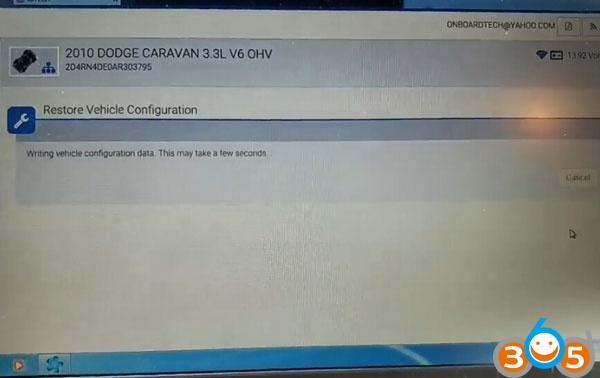
Download and write vehicle configuration data.
witech-dodge-pcm-swap-22

Vehicle configuration programmed successfully.
After market features may need to be reconfigured. Shut off the ignition, close all doors, and unplug the witech micropod 2 diagnostic tool from DLC for 1 minute.
witech-dodge-pcm-swap-23
Done.

2018/11/11

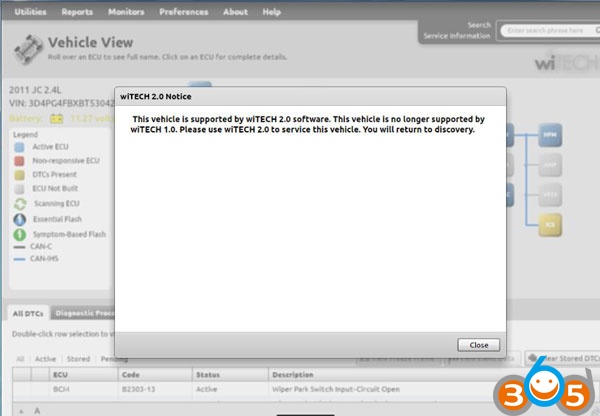
Micropod2 "Not Supported wiTECH 2.0 software" Solution

Here’s the working solution to Chrysler diagnostic tool wiTech Micropod 2 clone (#SP271-C1) “No longer Supported by wiTech 1.0” error.

Error:
“This vehicle is supported by wiTECH 2.o software. This vehicle is no longer supported by wiTECH 1.0. Please use wiTech 2.0 to service this vehicle. You will return to discovery. ”
witech-v10-error
Solution from obdii365.com engineer:

Please DON’T update your wiTech to V2.0 even if you have online account.  You cannot do downgrade anymore and will have risk of being locked by Chrysler server.

Solution 1.
Remove current version V17.04.27, download and install lower version witech 17.03.10.


Solution 2.
Reinstall computer operating system, and install wiTech V17.04.27 software again.

The current best solution is to install V17.03.10 version.

2018/11/07

How to use wiTECH v17.04.27 flash files: StarMOBILE, VCI Pod, MicroPod II

When exploring wiTECH v17.04.27 flash files located in DCC Tools folder, you can see 9 files:

StarMOBILE
vas-ppc-4.3.38.zip
sm-flash.zip
pe_stm.full.1.22.0.stm

VCI Pod
vas-armwipod-4.3.40.zip
wi-flash.zip
vservera.upgrade-mpvci-4.6.1.zip

MicroPod II
vas-armmicropodii-4.3.40.zip
upgrade-wmp-9.13.0.zip
mx.upgrade.2.4.1.zip


When you connect the tool to the computer, navigate to the web interface page and go to “/sysdebug.bsp”
http://172.22.22.22/webconfig/sysdebug.bsp
http://192.168.1.1/sysdebug.bsp
or whatever your router was set-up as. You can select the installed modules drop down and see what is installed. Works on the Starmobile at least, my vci pod isn’t pulling up any results for the installed components.
turns up the running system info.

The “http://172.22.22.22/webconfig/sysdebug.bsp” is the one confirmed to work properly. It is easiest to use the drop down menu on the page itself.
Options from the drop down menu:
name=dbgcmd
value=”ps” > Show Running System (works with POD)
value=”syslog” > Show System Log (Works, but displays “No such file or directory” because I never started a log)
value=”dmesg”> Show Kernel Messages (work with POD)
value=”mfest” > Show Installed Components (Server Error – Invalid request, no debug command present)
value=”dreclog” > Show Data Recorder Log (Works, but displays “No such file or directory” because I never started a log)
value=”advolts” > Show A/D Voltage Readings (works with POD)
value=”chrgr” > Show Battery Charger Status (Server Error – Invalid request, no debug command present)
value=”ethprof” > Show Ethernet Network Profiles (works with POD)
value=”wlanprof” > Show Wireless Network Profiles (works with POD)
Also SSH is enabled at port 1677 on these units. I just don’t know the username (could it be as simple as root?) and password combo. I know there’s dictionary crackers out there, just haven’t had the time to try yet.
Also available:
Linux System Logs: http://172.22.22.22/webconfig/syslogmgt.bsp
VComm Server Trace Logs: http://172.22.22.22/webconfig/vcommlogs.bsp


Something good to share:
For CDA5 (up to version 5.14 if I remember correctly) and witech1 (up to version 14.x.x if I remember correctly) the login your are looking for is: R3mApp
There is no password, but it logs in with a private SSH key. Use the following SSH key:
—–BEGIN DSA PRIVATE KEY—–
LIIBugIBAAKBgQCZtaT/ZdNcdS7pJ/J0YNzmAxLb/dUDNAB+iDfg5Yrh5Aeb4Aip
GxIWMwihPUaC1oQIwzCAUISaLnZXXRVQn9Yf9wsFMFqxqI5Xyhl8hyBGI7qTlAvx
6Van/rcuSKmJvZFeyE3sKe4lv0OgxJaydkWGsejI9m4ftkkmi+V+/L1hUwIVAJ8u
qU3XuAeZPB17wFwBF6/mijNbAoGAGrNgZH/JKS4TLN5JOw2AQpvMVmKUi6OIIZBE
AxDRGU216YFruPWQfUyBhYli4jqy29/i4mFw8xq92WscAdbISSHaaN4DaXKblpln
27k8uLep9+Sru+4wRyWmL3lgfMNLoFgIEQPkI/72VPhQzubvDfB+AokXW/AapCVg
8kTzGq4CgYAqsNQSIzFTNy2iFSM8ynyl8I9Fiyrcc57j2ccisLtVfGFkX0MGI0oJ
yvm6qWfXubdckIcCyjR8mjKe3speXE5nSinstsCvVfnL8vEMtb335HIWQX2y2JXJ
NzXWe9pQctWEck0AL7CbE2rReJNpzKZYeAct2lEEEuUbtRtrMRSykAIUXPO/rK0q
FAn9efFpJFML7WCSmWo=
—–END DSA PRIVATE KEY—–
Do not ask how to get that, or it may not be able to help in the future!


2018/11/06

Micropod 2 wiTech/DRB3 Review: 1997-2018 Chrysler Dodge Jeep Fiat

Look here: clone Micropod 2 test reports

Software to test with: wiTech and DRB3 software
Cars to test: 1997-2018 Chrysler, Dodge, Jeep, Fiat
Functions to test: basic diagnostics, key programming, reflash programming, module flashing, ABS bleeding

Test reports from users: (thanks for all the input)

2018 Jeep Wrangler:
FOBIK key programming done!
Car: 2018 JEEP WRANGLER 3.5L V6 24V WT ENGINE UPG I W/ESS

2016 Chrysler, Dodge, Jeep, Fiat:
100% CAN – equipped coverage to 2016 for Chrysler, Dodge, Jeep, and Fiat vehicle
Provide basic OBDII diagnosis
Have access to module for Re-Flash Programming, TSBs, wiring diagrams, and repair information.
Btw, wiTech ii supports chrysler and Fiat online programming, but the package from the vendor comes without  fiat software; i have my own micro pod 2 fiat software so that i can installation and programming. )

2015 Grand Cherokee:
Grand Cherokee 2015 RFHUB modify CRC and VIN
It’s really simple with micropod in offline mode . Just replace it .... and restor vehicle config.

2015 Chrysler 200:
The 2015 Chrysler 200, along with other Fiat-based models like the Jeep Renegade, Jeep Cherokee, and Ram Promaster, are all equipped with a rolling PIN Code.
Managed to program fobik with wiTECH app, when the 200 lost all keys

2015 RAM:
I traded in my 2015 RAM for a 2017 and confirmed that the wmicropod clone works with wiTech 17.04 patch level 11 works on my 2017 RAM.

I've heard rumblings that they changed things for the 2018 MY - doubt they will work.


2015 WK 3.6L and 2015 DS 5.7L:
I connected it to my 2015 DS and my wife's 2015 WK with no issues. I disabled the side view mirror tilt in reverse on her WK (only thing she didn't like about it) and she was thrilled. There are functions to bleed ABS, program tire sizes, etc. There are literally hundreds of sensor readings, dozens of tests, actuators and misc functions that you can perform that seem to be very vehicle specific - which you would expect. Every switch/gadget in the vehicle seems to have a corresponding sensor reading of some kind in the software. The only odd behavior I saw was when I connected to the ABS computer of my DS... the EVIC freaked out and started screaming to service the ABS. Maybe that is a safety feature of some kind so folks don't go driving while messing with the ABS computer? Powering the vehicle off and on again made the ABS warning go away. I could not find any "PROXI alignment" functions - maybe they don't apply to my vehicles?

2014 dodge avenger:
One vehicle i tested with: a 2014 dodge avenger …. just fine.
was able to flash a module update and program a new key with the unit.
try the emulator on: DRB III emulator confirmed working.

2010 Charger:
I tested it on a 2010 Charger under witech and works flawlessly

2006 Jeep Liberty:
2006 Jeep Liberty CRD Limited 4X4
I ordered a witech micropod2 clone with drb3 functionality.
MicroPod II comes with version 17.04.27 software, drb3 support is not installed automatically but can still be found after install. Says it’s good for offline use only, but that should be enough to mess with the TPMS.
All modules except the BCM and ABS computer are still compatible with the DRBIII on the 06’s.
This is a working offline Witech. I just got it connected successfully. Software V17.04.27 was installed on a Windows 7 laptop no problem. It did successfully populate the VIN and can read the ECU.

2004 Dodge:
got a 2004 Dodge pickup and under the emulator worked perfectly.

2003 PT Cruiser:
Basically no other modules other than the Engine, work. I cannot connect to the transmission, ABS, VTSS, SKIM, radio, cluster, etc. But everything in the engine module can be tested, actuated, etc.
Luckily for me, I really only needed the DRBIII to write the Pinion factor for manual transmissions, which is conveniently in the ‘engine’ part which works.
Maybe I really need to invest in an older VCI pod so that everything else works.

Chrysler after 2003:
Micropod 2 with wiTECH only works for Chrysler made after the year 2003

old Chysler 1997 – 2004 (2005):
Micropod 2 work well with DRBIII emulator for old Chysler the year 1997 – 2004 (2005)

Good to know: When to use DRB3 & when to use wiTech? 
The DRB3 emulator is part of Chrysler’s Witech software. The Witech software supports two different pass-through devices, The VCI pod which is sold with the Witech system and the Chrysler Starmobile. The DRB3 emulator is a convenience item for dealerships to allow the use of their current witech scan-tool on older non CAN bus vehicles. It is not by any means a cost saving option.

Attachment: Micropod 2 DRB 3 Emulator Car List:
DRB 3 supports Chrysler, Jeep, and Dodge dealerships to service non-CAN based vehicles from 1998-2007

Images: cloned Micropod 2 full kit
micropod2-kit-1

micropod2-kit-2

micropod2-kit-3

micropod2-kit-4

micropod2-kit-5